You cannot trust a guarantee you cannot watch: building observability into a three-region MongoDB cluster
Earlier builds in this series established what the cluster promises. Writes are acknowledged only when a majority of regions hold them durably. Reads return data that cannot be rolled back. Six identities are each scoped to exactly what they need and refused everything else. Every one of those guarantees was proven at the moment it was built.
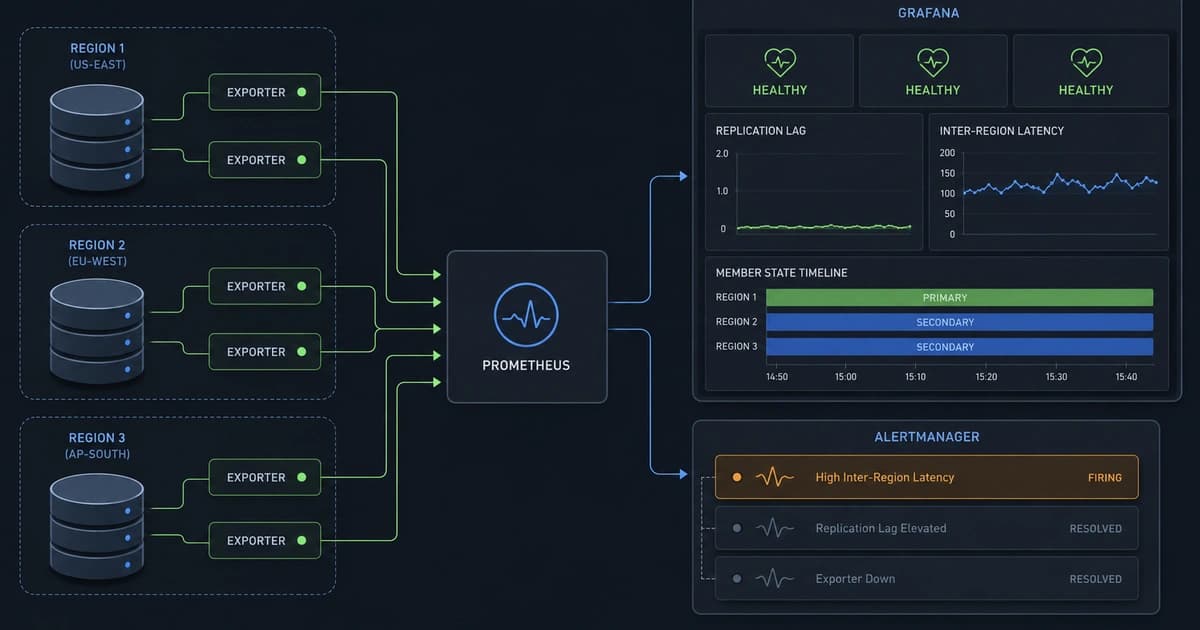
Proven once is not the same as kept. A guarantee holds until something quietly stops holding it, and the gap between "it worked when I tested it" and "it is working right now" is where production systems fail. A secondary falls behind and majority acknowledgment slows. A disk fills and mongod dies on its next write. A node goes down and the cluster runs degraded for hours. None of these announce themselves. They are found late, by the people they hurt.
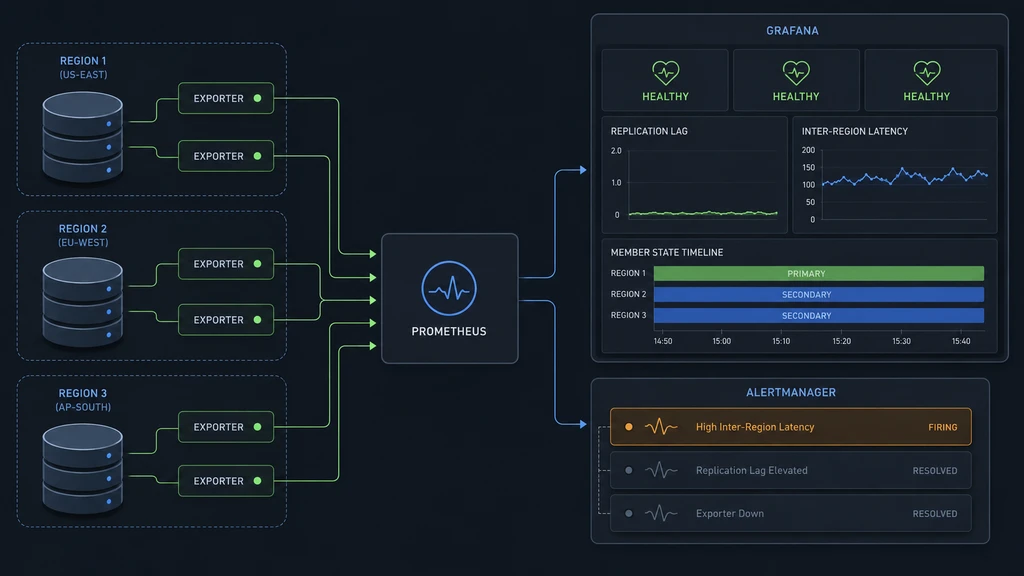
This build closes that gap. It turns the internal state of MongoDB and the three hosts underneath it into signals you can watch, and it defines the thresholds that separate healthy from failing. The stack is self-hosted: Prometheus collects and stores the metrics, Grafana draws the dashboards, Alertmanager routes the alerts, and small exporters on every node expose the numbers. All of it runs on a dedicated monitoring host that sits apart from the data nodes, provisioned and networked with the same patterns established earlier in this series, so that groundwork is assumed here rather than repeated. What follows is the observability layer itself, in the order you build it, with the two problems you will hit along the way and how to get past them.
Start with the identity that will do the watching#
Before installing anything, decide who reads the metrics. The cluster already has the right identity. When the RBAC model was built, one of the six certificates was a monitor: a service identity scoped to read cluster health and nothing else, with no access to the ledger and no ability to change configuration. Until now a human used it for the occasional status check. It is about to get a machine consumer, and the machine has requirements the human never exercised.
The MongoDB exporter needs two privileges the monitor identity does not yet hold: the built-in clusterMonitor role, and read access to the local database, where replication and oplog state live. Grant them, but grant them as the user-administration identity, not the cluster administrator. Changing a user's roles is a user-administration action, and keeping that boundary is the whole point of having built separate identities. Connect as the user-admin identity and run:
db.getSiblingDB("$external").runCommand({
grantRolesToUser: "CN=meetadev-monitor,OU=cluster-clients,O=Meetadev,DC=internal,DC=mongo",
roles: [
{ role: "clusterMonitor", db: "admin" },
{ role: "read", db: "local" }
]
})grantRolesToUser adds these alongside the identity's existing custom monitoring role rather than replacing it. Confirm the result:
db.getSiblingDB("$external").getUser("CN=meetadev-monitor,OU=cluster-clients,O=Meetadev,DC=internal,DC=mongo")The user now carries three roles: the original hand-defined monitoring role, plus the two the exporter documents.
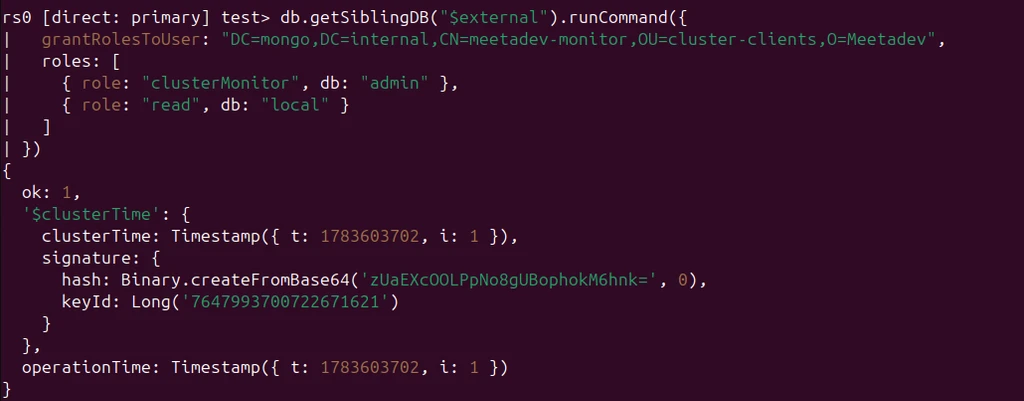
It still cannot read a single transaction. The widening was bounded to exactly what the tool documents it needs, verified against that documentation, and nothing more. Least privilege is not a posture you strike once and freeze. It is a running practice: each new consumer gets precisely what it requires, when it requires it. A monitoring credential on a financial system that can also read the ledger is not observability. It is an exfiltration path wearing a badge.
The exporter refuses to connect, and it is right to#
The MongoDB exporter connects to mongod over the same mutual TLS the rest of the cluster uses, authenticating with the monitor certificate. Before wrapping it in a service, run it once by hand in the foreground, so any failure shows up immediately instead of buried in a service log. The certificate and CA chain are staged in a locked-down directory owned by a dedicated mongodb_exporter user, the private material at mode 600:
sudo -u mongodb_exporter mongodb_exporter \
--mongodb.uri="mongodb://node-uae.mongo.internal:27017/?authMechanism=MONGODB-X509&authSource=%24external&tls=true&tlsCertificateKeyFile=/etc/mongodb_exporter/monitor.pem&tlsCAFile=/etc/mongodb_exporter/ca-chain.cert.pem" \
--web.listen-address=10.1.1.4:9216 \
--collect-allIt listens, then refuses the connection to mongod:
x509: certificate relies on legacy Common Name field, use SANs insteadThis is worth stopping on, because it is a real defect the monitoring build just surfaced. The node certificates, issued back when the PKI was built, carried the hostname only in the Common Name field. They have no Subject Alternative Name. Modern TLS clients reject that outright, because the Common Name was deprecated for hostname verification years ago and a certificate with no SAN cannot be validated against the host it claims to be. The certificates have been deficient since the day they were issued. Nothing caught it, because every client that had connected until now was lenient enough to let it pass. The exporter's Go TLS stack is the first strict client to arrive, and it found the flaw in seconds.
There is a fast way past this and a correct way, and the difference matters more here than almost anywhere else in the series. The fast way is to add tlsInsecure=true to the connection string. The traffic still encrypts and the certificate chain still validates; only the hostname check turns off. It would work in under a minute. It is also exactly wrong for a system built to be trusted with money, and it is wrong in a way that anyone following this to build their own cluster would inherit. Publishing "skip verification when it is inconvenient" hands every reader a security hole. The certificates are the problem. Fix the certificates.
Reissue the node certificates with SANs, without downtime#
The correct fix is to reissue all three node certificates with proper Subject Alternative Names, and to do it while the cluster keeps serving. This is a rolling certificate rotation on a live replica set, and it is a genuinely useful procedure that most write-ups skip.
Start on the host that holds the certificate authority. Add a per-node SAN extension for each member to the CA's OpenSSL config. Back the file up first, then append three sections:
[ v3_member_uae ]
subjectKeyIdentifier = hash
authorityKeyIdentifier = keyid,issuer
basicConstraints = critical, CA:false
keyUsage = critical, digitalSignature, keyEncipherment
extendedKeyUsage = serverAuth, clientAuth
subjectAltName = DNS:node-uae.mongo.internal, IP:10.1.1.4
[ v3_member_southafrica ]
subjectKeyIdentifier = hash
authorityKeyIdentifier = keyid,issuer
basicConstraints = critical, CA:false
keyUsage = critical, digitalSignature, keyEncipherment
extendedKeyUsage = serverAuth, clientAuth
subjectAltName = DNS:node-southafrica.mongo.internal, IP:10.2.1.4
[ v3_member_westeurope ]
subjectKeyIdentifier = hash
authorityKeyIdentifier = keyid,issuer
basicConstraints = critical, CA:false
keyUsage = critical, digitalSignature, keyEncipherment
extendedKeyUsage = serverAuth, clientAuth
subjectAltName = DNS:node-westeurope.mongo.internal, IP:10.3.1.4Each section keeps the existing member-certificate profile and adds that node's own SAN, with both the DNS name and the private IP, so verification works whether a client connects by name or by address.
The rotation itself rests on one fact that makes it safe: the identity of each node does not change. Same distinguished name, same private key, same everything the cluster authenticates on. Only the certificate gains a SAN. Because the distinguished name is untouched, a reissued node re-authenticates to its peers exactly as before. The order is what protects availability. Roll the secondaries first, one at a time, verifying each before moving on. The primary comes last, and it is stepped down on command rather than simply restarted.
Take the first secondary. The CA still holds its original signing request, so you re-sign that same request against the new extension. The CA enforces one valid certificate per distinguished name, so revoke the old one first, then sign:
sudo openssl ca -config /etc/pki/meetadev-mongo-ca/openssl.cnf \
-revoke /etc/pki/meetadev-mongo-ca/newcerts/1001.pem
sudo openssl ca -config /etc/pki/meetadev-mongo-ca/openssl.cnf \
-extensions v3_member_southafrica -days 365 -notext \
-in /etc/pki/meetadev-mongo-ca/csr/node-southafrica.csr.pem \
-out /tmp/node-southafrica-san.cert.pemThe CA prints the certificate details before asking you to commit. Read them before you type yes. The SAN must be there:
X509v3 Subject Alternative Name:
DNS:node-southafrica.mongo.internal, IP Address:10.2.1.4mongod loads a combined PEM of certificate plus key. Move the new certificate onto the node, then build the new combined file from the new SAN certificate and the node's existing key. Back up the current one, set ownership and permissions to match, and validate before you swap anything:
sudo cp /etc/mongodb/tls/node-southafrica.combined.pem \
/etc/mongodb/tls/node-southafrica.combined.pem.pre-san.bak
sudo bash -c 'cat /tmp/node-southafrica-san.cert.pem \
/etc/mongodb/tls/private/node-southafrica.key.pem \
> /etc/mongodb/tls/node-southafrica.combined.pem.new'
sudo chown mongodb:mongodb /etc/mongodb/tls/node-southafrica.combined.pem.new
sudo chmod 600 /etc/mongodb/tls/node-southafrica.combined.pem.new
sudo openssl x509 -in /etc/mongodb/tls/node-southafrica.combined.pem.new \
-noout -subject -ext subjectAltNameThat last command confirms the subject distinguished name is unchanged and the SAN is present. Only once you have seen both, swap the file in and restart mongod. A secondary restarting does not trigger an election, so the primary keeps serving the whole time:
sudo mv /etc/mongodb/tls/node-southafrica.combined.pem \
/etc/mongodb/tls/node-southafrica.combined.pem.old
sudo mv /etc/mongodb/tls/node-southafrica.combined.pem.new \
/etc/mongodb/tls/node-southafrica.combined.pem
sudo systemctl restart mongodGive it a few seconds, then confirm from the primary that the node rejoined and is replicating before you touch anything else. Repeat this entire sequence for the second secondary, changing only the serial number, the region's extension name, and the node's filenames.
The primary is last, and it is not simply restarted. Step it down first, so a chosen secondary takes over cleanly instead of the cluster scrambling through an unplanned election. Step-down is a cluster-management action, so it runs as the cluster-admin identity, not the monitor:
rs.stepDown(60)The former primary is now a secondary. Reissue and swap its certificate exactly as you did the others, restart it, and its configured priority pulls the primary role back once it has caught up. When it settles, check the whole set:

Three certificates reissued across three continents, three restarts, one deliberate step-down, zero downtime. The old certificates were revoked in the CA ledger rather than left as phantoms, so the record shows one valid certificate per node and the deficient ones marked replaced. Now run the exporter again, by hand, with full hostname verification and no lenient flags:
sudo -u mongodb_exporter mongodb_exporter \
--mongodb.uri="mongodb://node-uae.mongo.internal:27017/?authMechanism=MONGODB-X509&authSource=%24external&tls=true&tlsCertificateKeyFile=/etc/mongodb_exporter/monitor.pem&tlsCAFile=/etc/mongodb_exporter/ca-chain.cert.pem" \
--web.listen-address=10.1.1.4:9216 --collect-allIt connects. In another shell, scrape it:
curl -s http://10.1.1.4:9216/metrics | grep "mongodb_up" | grep -v "#"
# mongodb_up{cluster_role="mongod"} 1
Adding observability to a system is an act of scrutiny, and scrutiny finds things. The SAN gap had been sitting in the cluster since the PKI was built, invisible because nothing had looked hard enough. Finding it is not a failure of the monitoring build. It is the monitoring build doing its job before the metrics even started flowing.
Exporters on every node, as services#
With the connection proven by hand, make it permanent. Each data node runs two exporters. The node exporter reads host state: processor, memory, disks. Install the binary and a dedicated user:
cd /tmp
curl -LO https://github.com/prometheus/node_exporter/releases/download/v1.11.1/node_exporter-1.11.1.linux-amd64.tar.gz
tar xf node_exporter-1.11.1.linux-amd64.tar.gz
sudo mv node_exporter-1.11.1.linux-amd64/node_exporter /usr/local/bin/
sudo useradd --no-create-home --shell /usr/sbin/nologin node_exporterWrite its service. Note the bind address: the node's private IP, never 0.0.0.0, so the exporter is not even listening on the public interface. Combined with a network rule that admits only the monitoring host, that is defense in depth:
[Unit]
Description=Prometheus Node Exporter
Wants=network-online.target
After=network-online.target
[Service]
User=node_exporter
Group=node_exporter
Type=simple
ExecStart=/usr/local/bin/node_exporter --web.listen-address=10.1.1.4:9100
Restart=on-failure
NoNewPrivileges=true
ProtectHome=true
ProtectSystem=strict
[Install]
WantedBy=multi-user.targetsudo systemctl daemon-reload
sudo systemctl enable --now node_exporterThe MongoDB exporter becomes a service too. Its unit carries the x.509 URI you already proved works, with one trap that will cost you an hour if you miss it: systemd treats % as the start of a specifier, so the %24 that URL-encodes the $ in $external has to be doubled to %%24 inside the unit file, or systemd mangles the URI and the exporter cannot connect:
[Unit]
Description=Percona MongoDB Exporter
After=network-online.target mongod.service
[Service]
User=mongodb_exporter
Group=mongodb_exporter
Type=simple
ExecStart=/usr/local/bin/mongodb_exporter --mongodb.uri=mongodb://node-uae.mongo.internal:27017/?authMechanism=MONGODB-X509&authSource=%%24external&tls=true&tlsCertificateKeyFile=/etc/mongodb_exporter/monitor.pem&tlsCAFile=/etc/mongodb_exporter/ca-chain.cert.pem --web.listen-address=10.1.1.4:9216 --collect-all
Restart=on-failure
NoNewPrivileges=true
ProtectHome=true
ProtectSystem=strict
[Install]
WantedBy=multi-user.targetsudo systemctl daemon-reload
sudo systemctl enable --now mongodb_exporter
curl -s http://10.1.1.4:9216/metrics | grep "mongodb_up" | grep -v "#"That is one node done: node exporter on 9100, MongoDB exporter on 9216, both bound to the private address, both authenticated. Repeat the entire exporter installation on the other two nodes, changing only the bind address to each node's private IP and, in the MongoDB exporter URI, the hostname to that node's FQDN. When all three are running you have six exporters, and the collector has something to scrape.
Collect and store, from a host that sits outside the cluster#
The monitoring stack lives on its own host, deliberately separate from the three data nodes. This is the one architectural decision worth stating plainly. Monitoring that runs on the thing it monitors dies with it. Put the collector on a data node, and the moment that node fails you lose the node and the ability to see that you lost it, at exactly the moment you need to see it. The monitoring host watches from outside.
Install Prometheus with its own user and data directory:
cd /tmp
curl -LO https://github.com/prometheus/prometheus/releases/download/v3.12.0/prometheus-3.12.0.linux-amd64.tar.gz
tar xf prometheus-3.12.0.linux-amd64.tar.gz
sudo mv prometheus-3.12.0.linux-amd64/prometheus /usr/local/bin/
sudo mv prometheus-3.12.0.linux-amd64/promtool /usr/local/bin/
sudo useradd --no-create-home --shell /usr/sbin/nologin prometheus
sudo mkdir -p /etc/prometheus /var/lib/prometheus
sudo chown prometheus:prometheus /var/lib/prometheusThe scrape configuration is where the design lives. Every target is labelled with its region and node, so a number is never just a number; it is always this region, this node, right now. That labelling is what later lets a dashboard say which region is degraded rather than merely that something is:
global:
scrape_interval: 15s
external_labels:
cluster: meetadev-rs0
scrape_configs:
- job_name: node
static_configs:
- targets: ['10.1.1.4:9100']
labels: { region: uae-north, node: node-uae }
- targets: ['10.2.1.4:9100']
labels: { region: south-africa-north, node: node-southafrica }
- targets: ['10.3.1.4:9100']
labels: { region: west-europe, node: node-westeurope }
- job_name: mongodb
static_configs:
- targets: ['10.1.1.4:9216']
labels: { region: uae-north, node: node-uae }
- targets: ['10.2.1.4:9216']
labels: { region: south-africa-north, node: node-southafrica }
- targets: ['10.3.1.4:9216']
labels: { region: west-europe, node: node-westeurope }The service runs with thirty-day retention, which is a financial-grade decision, not a default. You keep enough history to investigate an incident after the fact and to answer a review that asks whether the cluster held its guarantees last week, not only whether it is holding them this second:
ExecStart=/usr/local/bin/prometheus \
--config.file=/etc/prometheus/prometheus.yml \
--storage.tsdb.path=/var/lib/prometheus \
--storage.tsdb.retention.time=30d \
--web.listen-address=0.0.0.0:9090Prometheus listens on 9090, reachable only inside the host and the private network, never opened to the internet. Validate the config, start it, and confirm every target is being scraped:
promtool check config /etc/prometheus/prometheus.yml
sudo systemctl daemon-reload
sudo systemctl enable --now prometheus
sleep 15 && curl -s http://localhost:9090/api/v1/targets | grep -o '"health":"[^"]*"' | sort | uniq -c
Six exporters healthy across three regions, scraped over the private network through rules that admit only the monitoring host, plus Prometheus scraping itself. The pipeline runs from the database's internals all the way to stored, regionally labelled time series.
The dashboard, and the dead ends on the way to it#
Grafana installs cleanly from its APT repository:
sudo mkdir -p /etc/apt/keyrings/
wget -q -O - https://apt.grafana.com/gpg.key | sudo gpg --dearmor | sudo tee /etc/apt/keyrings/grafana.gpg > /dev/null
echo "deb [signed-by=/etc/apt/keyrings/grafana.gpg] https://apt.grafana.com stable main" | sudo tee /etc/apt/sources.list.d/grafana.list
sudo apt-get update && sudo apt-get install -y grafana
sudo systemctl enable --now grafana-serverLog in, and add Prometheus as a data source pointing at http://localhost:9090. Save and test; it should query successfully. That completes the pipeline from exporter to graph.
Now, two dead ends, because you will hit both and they cost real time. The first: do not reach for a popular community MongoDB dashboard and expect it to work. The well-known ones are built for the old exporter metric names, and this exporter, run with --collect-all, emits the newer verbose names instead. Import one and every panel reads "No data." It is not broken; the names simply do not match. The honest, and better, path is to build a small dashboard against the metrics the exporter actually emits, which you can discover in Grafana's Explore view by querying the metric families directly.
The second dead end is more subtle and will make you think your queries are wrong when they are fine. A freshly built dashboard defaults to a wide time range. With only an hour of data collected, thirty days of empty axis renders as "No data" on every panel. Set the range to the last hour before you conclude anything is broken. This single setting accounts for most of the "it isn't working" moments in a new Grafana install.
With those out of the way, the queries that carry the durability story are worth showing, because they are the ones people get wrong. Member state, showing which node holds the primary:
max by (member_idx) (mongodb_rs_members_state{member_state=~"PRIMARY|SECONDARY"})Replication lag, the newest optime anywhere minus each member's own optime, in seconds. The scalar() is load-bearing: without it, Prometheus will not subtract a single aggregate value from a set of labelled series, and the panel silently returns nothing:
(scalar(max(mongodb_rs_members_optimeDate)) - max by (member_idx) (mongodb_rs_members_optimeDate)) / 1000Inter-member ping, the heartbeat round trip between regions:
max by (member_idx) (mongodb_rs_members_pingMs)That ping panel is the durability build made continuous. The roughly one hundred milliseconds measured once, in an earlier build, as the cost of a majority write across regions is now watched every fifteen seconds. When it climbs, majority acknowledgment is slowing, and you see it before a write does.
The dashboard is built in three tiers, and the full definition is offered as downloadable JSON at the end of this piece so you can import it directly rather than rebuild it panel by panel. The top tier watches durability and replication: member state, replication lag, inter-member ping, and a durable optime gap that shows how far each region trails the newest journal-flushed write, which is the majority-and-journal guarantee itself, made observable. The middle tier covers cluster health: nodes up per region, operation throughput by type, member health from the primary's view. The bottom tier covers the hosts underneath, the processor and memory and disk the database depends on.
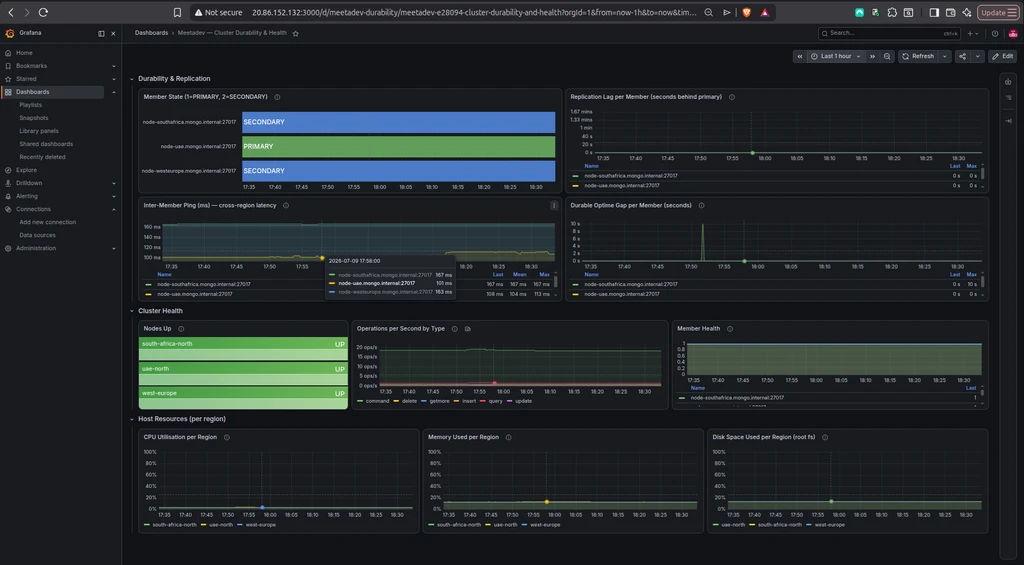
The dashboard shows a healthy cluster: one primary, two secondaries, replication lag flat at zero, and the ping panel showing the real geography of the deployment, regions sitting near one hundred milliseconds apart with the more distant pair closer to one hundred sixty. Sit with that ping panel for a moment. It is not a synthetic benchmark. It is the physical cost of durability, measured continuously. When it moves, the guarantee is moving.
Thresholds are arguments, and every one defends a guarantee#
A metric you look at is a dashboard. A metric that pages you is an alert, and this is where observability stops being passive. Every threshold is an argument about what constitutes trouble, and for a financial cluster each argument should tie back to the guarantee it defends or the failure it prevents. Prometheus evaluates the rules from a file. The core durability rules:
groups:
- name: meetadev-durability
rules:
- alert: MongoNodeDown
expr: mongodb_up == 0
for: 1m
labels: { severity: critical }
annotations:
summary: "MongoDB node down in {{ $labels.region }}"
- alert: MongoNoPrimary
expr: max(mongodb_rs_members_state{member_state="PRIMARY"}) != 1
for: 30s
labels: { severity: critical }
annotations:
summary: "Replica set has no PRIMARY; cluster cannot accept writes"
- alert: MongoReplicationLagHigh
expr: (scalar(max(mongodb_rs_members_optimeDate)) - max by (member_idx) (mongodb_rs_members_optimeDate)) / 1000 > 10
for: 2m
labels: { severity: warning }
annotations:
summary: "Replication lag > 10s on {{ $labels.member_idx }}; durability degrading"
- alert: MongoInterMemberLatencyHigh
expr: max by (member_idx) (mongodb_rs_members_pingMs) > 300
for: 5m
labels: { severity: warning }
annotations:
summary: "Inter-member ping > 300ms (baseline ~100ms); majority commit slowing"Read the thresholds as the arguments they are. A node down for over a minute is critical, because it puts quorum and majority writes at risk. No member reporting as primary is critical, because the cluster cannot accept a write until an election resolves. Replication lag past ten seconds is a warning that the durability guarantee is quietly degrading. The latency threshold at three hundred milliseconds is anchored to the roughly one-hundred-millisecond baseline this cluster actually runs at, measured in an earlier build, not a number pulled from the air; when the real latency triples, majority acknowledgment is in trouble.
Two host rules come straight from how these systems fail in the field rather than from a tidy diagram. The first is disk, and the obvious version of the rule gets it wrong. On these nodes the data lives on one mounted volume and the MongoDB log on another. mongod terminates when it cannot write its log, and it will do that even when the data volume has room to spare, because a full log volume alone is enough to bring the process down. A disk alert that watches only the root filesystem would sail straight past a log volume filling toward full. So the rule watches every real mountpoint, names the mount in the alert, and comes in two tiers, because eighty percent is "plan to act" and ninety percent is "act now," and collapsing them into one number either pages too early and trains people to ignore it, or pages too late and turns a plannable cleanup into an outage:
- name: meetadev-host
rules:
- alert: HostDiskSpaceHigh
expr: (1 - (node_filesystem_avail_bytes{fstype!~"tmpfs|vfat|overlay"} / node_filesystem_size_bytes{fstype!~"tmpfs|vfat|overlay"})) * 100 > 80
for: 5m
labels: { severity: warning }
annotations:
summary: "Disk > 80% on {{ $labels.mountpoint }} in {{ $labels.region }}; a full log path or dbPath kills mongod"
- alert: HostDiskSpaceCritical
expr: (1 - (node_filesystem_avail_bytes{fstype!~"tmpfs|vfat|overlay"} / node_filesystem_size_bytes{fstype!~"tmpfs|vfat|overlay"})) * 100 > 90
for: 2m
labels: { severity: critical }
annotations:
summary: "Disk > 90% on {{ $labels.mountpoint }} in {{ $labels.region }}; imminent mongod termination risk"A full log disk taking a database down is not hypothetical. It is one of the most common ways a healthy-looking MongoDB deployment falls over, and this rule exists specifically because that failure has happened before, to real clusters, at bad times. A further rule watches rising average operation latency, which is the signal for slow and long-running queries, the kind that degrade a system for hours before anyone links the scattered complaints to a cause. The complete rules file is offered as a download at the end.
Point Prometheus at the rules and at the alert router, then validate and reload:
rule_files:
- /etc/prometheus/meetadev-alerts.yml
alerting:
alertmanagers:
- static_configs:
- targets: ['localhost:9093']promtool check rules /etc/prometheus/meetadev-alerts.yml
promtool check config /etc/prometheus/prometheus.yml
sudo systemctl restart prometheusWith the cluster healthy, every rule should read green, which is exactly what a working alert set looks like when nothing is wrong. To prove the pipeline actually fires on real data rather than trusting that it would, add a temporary rule with a threshold set deliberately below the real inter-member ping, so a genuine metric crosses it:
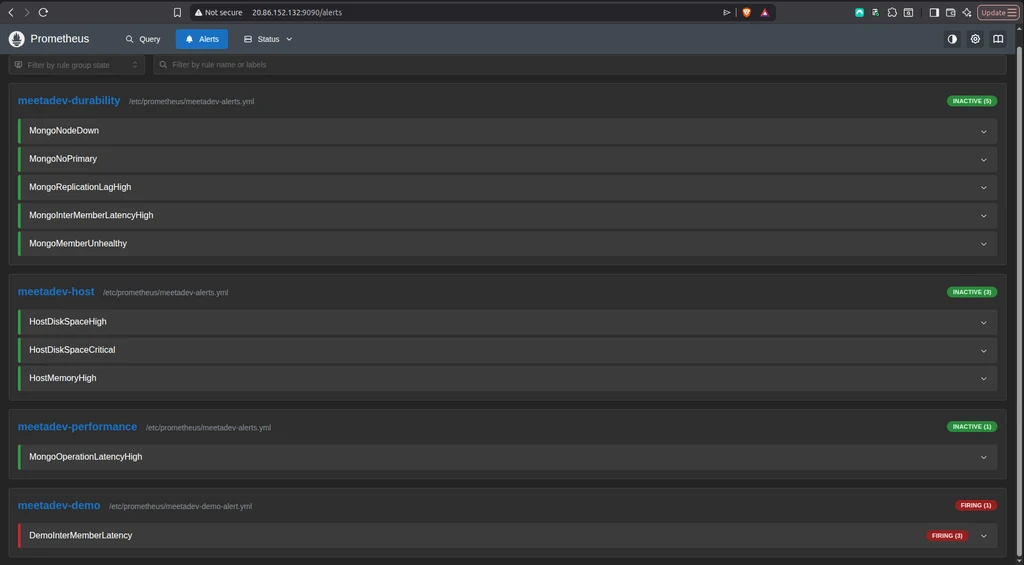
Everything green except the one rule set below the live baseline, which fires on genuine latency data, not a fabricated condition. Every incident class that has ever taken one of these systems down at three in the morning now has a rule watching for it.
Make sure the alert reaches a human#
Firing is only half the job. An alert that fires into a void is no better than no alert, and "the node went down and nobody noticed" is a failure of notification, not detection. Install Alertmanager:
cd /tmp
curl -LO https://github.com/prometheus/alertmanager/releases/download/v0.33.1/alertmanager-0.33.1.linux-amd64.tar.gz
tar xf alertmanager-0.33.1.linux-amd64.tar.gz
sudo mv alertmanager-0.33.1.linux-amd64/alertmanager /usr/local/bin/
sudo mv alertmanager-0.33.1.linux-amd64/amtool /usr/local/bin/
sudo useradd --no-create-home --shell /usr/sbin/nologin alertmanager
sudo mkdir -p /etc/alertmanager /var/lib/alertmanager
sudo chown alertmanager:alertmanager /var/lib/alertmanagerThe routing is the substance, not the install. Three behaviours matter. Group related alerts, so one underlying problem does not arrive as fifty separate pages. Route by severity, so a critical takes a faster and more persistent path than a warning. And inhibit the warnings a critical would otherwise bury, so a downed node pages you about the node itself, not about every downstream warning the outage produced:
route:
group_by: ['alertname', 'region']
group_wait: 30s
repeat_interval: 4h
receiver: default
routes:
- matchers: [ severity="critical" ]
receiver: critical
group_wait: 10s
repeat_interval: 1h
- matchers: [ severity="warning" ]
receiver: warning
inhibit_rules:
- source_matchers: [ severity="critical" ]
target_matchers: [ severity="warning" ]
equal: ['alertname', 'region']Critical alerts wait only ten seconds and repeat every hour: fast and persistent, the behaviour you want when a region is down. Warnings take a gentler cadence. Validate the config, wire in a real email or chat receiver where the receiver blocks point, and start the service. Prometheus routes every firing alert here.
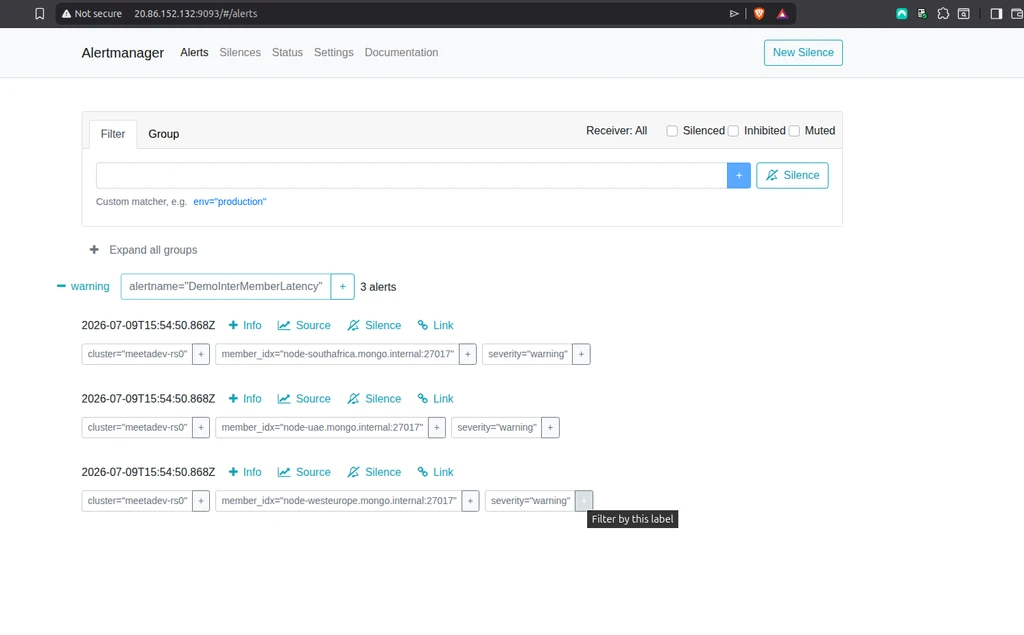
The alert arrives grouped, labelled with the cluster and the exact members involved, tagged by severity, ready to be sent wherever an on-call engineer will see it. The condition cannot go unnoticed, which was the entire point.
What this layer is, and is not#
The cluster is now legible. Its internal state is collected from a host outside itself, stored with enough history to investigate the past, drawn on a dashboard that answers whether the guarantees are holding, and watched by alert rules each tied to a specific guarantee or a specific way these systems fail. The identity doing the watching is scoped to read health and nothing else, and the whole apparatus sits apart from the cluster it observes, so a regional failure cannot blind the thing meant to see it.
What this layer is not, yet, is intelligent. Everything here is deterministic. A threshold is crossed or it is not. A rule fires or it does not. That is exactly right for the guarantee layer, and it is where the guarantee layer must stay: the decision that a write is durable, the decision to page a human, the thresholds that protect money, all of it fixed, auditable, and dull on purpose. But deterministic thresholds have real limits. They catch a disk at eighty percent; they do not notice it is filling three times faster than yesterday and will cross the line in six hours. They catch latency past a fixed number; they miss a slow drift that stays under the line while steadily worsening. They fire on a symptom; they do not correlate three symptoms into one cause the way an experienced engineer does at a glance, and on a bad night that correlation is slow, error-prone human work.
That correlation is the seam where analysis belongs, and it belongs in a layer above this one, never inside it. An analysis layer can learn the normal shape of these metrics and flag the abnormal drift a static threshold misses. It can take a firing alert and the surrounding signals and produce a first-pass diagnosis, the reasoning an engineer would otherwise assemble by hand under pressure. It can watch the fill rate, not just the fill line. What it must never do is decide whether a write is durable, or move a threshold that protects the ledger. It interprets; it does not guarantee. The deterministic foundation built here is exactly what makes an analysis layer safe to add later, because the intelligence would sit on top of signals that are already sound rather than generating its own ground truth.
The access model that scopes the identity doing all this watching was built earlier in this series, in the RBAC build where least privilege stopped being a claim. The durability guarantees these dashboards and alerts exist to watch were built and measured in the write-and-read-concern build. Those builds established what the cluster promises. This one made the promises watchable. The next makes the watching intelligent, and draws the line, carefully, between the analysis layer and the guarantee layer, because in a system that moves money that line is not a detail. It is the whole design.
Building something similar, or want to argue about where the analysis layer ends and the guarantee layer begins? I run a community for MongoDB builders on Meetadev, MongoDB AI Builders, where this series and the decisions behind it get worked through in the open. Come break things with us.
Comments