The database that says no first: installing and hardening MongoDB on Azure
A self-hosted MongoDB 8.2 install across three Azure regions, configured to require TLS, enforce x.509 cluster authentication, and refuse every connection that doesn't present a valid client certificate — including the operator's. What the install actually takes, and the half-dozen operational details the documentation doesn't connect for you.

The setup#
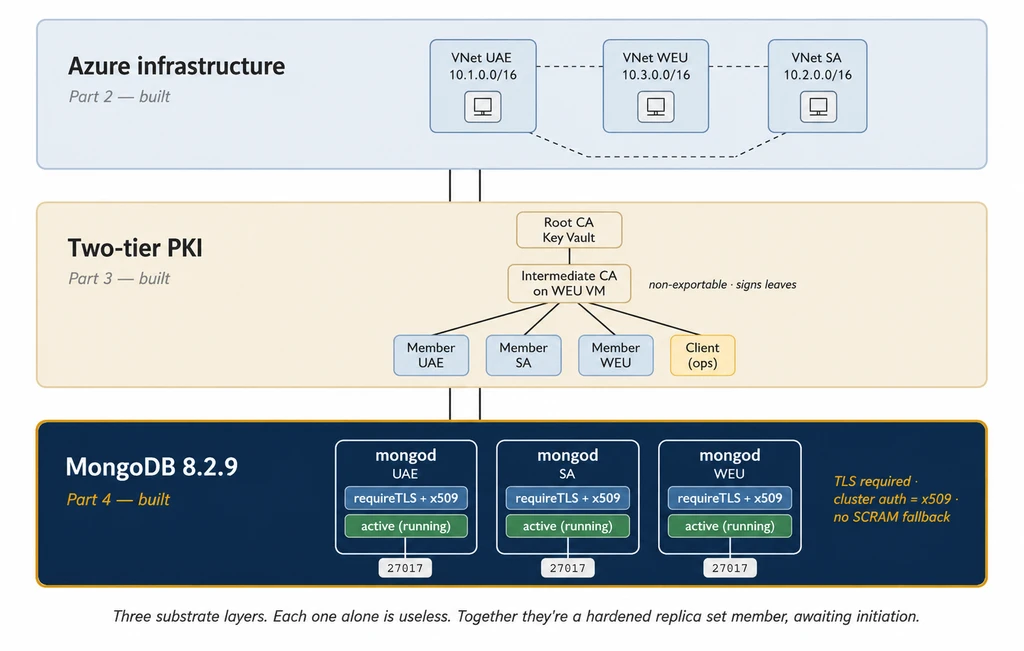
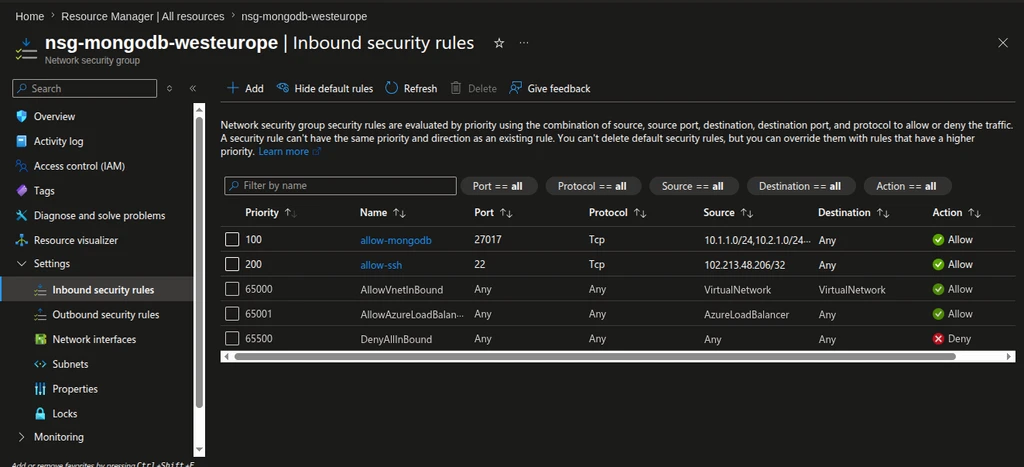
Three Ubuntu 22.04 VMs, one in UAE North, one in South Africa North, one in West Europe. Private DNS resolves each by hostname across a VNet mesh. NSGs deny everything except MongoDB traffic between the three subnets and SSH from the operator's /32. A two-tier PKI has issued four certificates — three for the cluster members, one for the operator — signed by an intermediate CA whose root sits in Azure Key Vault and never moves.
Each VM's hostname matches its certificate's primary SAN:
$ hostname --fqdn
vm-mongodb-uae # Azure VM name; the mongod identity is node-uae.mongo.internalWhat this infrastructure does not yet have is a database. No mongod process exists. Port 27017 is not listening anywhere. The TLS certificates sit in /etc/mongodb/tls/ on each node, encrypted at rest, waiting for the only process on the cluster that has any reason to read them.
This part installs that process.
Storage before installation#
Disk layout is the choice made before installing the database, not after. MongoDB stores data at /var/lib/mongodb — and on a default Azure VM, that path is on the same disk as the operating system, a 30 GiB OS disk shared with everything else the VM does. Conflating OS lifecycle with data lifecycle is a common operational regret, and it is avoidable in the time it takes to type one Azure CLI command per node.
Three Premium SSD P6 disks, 64 GiB each, one per VM. P6 is the smallest Premium tier — 240 IOPS, 50 MB/s throughput — and the choice is calibrated. A production financial workload would size at P10 (500 IOPS) or higher; P30 is more typical for actual transaction throughput. The series sits well below that bar by design. P6 gives this build enough headroom that the disk never becomes the bottleneck, while keeping the monthly cost honest for personal infrastructure. The production upgrade path is direct: resize the disks, no other architectural change required.
Provisioning runs in two az calls per VM, one to create the disk and one to attach it at LUN 0:
az disk create \
--resource-group rg-mongodb-uae-north \
--name disk-mongodb-data-uae \
--location uaenorth \
--size-gb 64 \
--sku Premium_LRS
az vm disk attach \
--resource-group rg-mongodb-uae-north \
--vm-name vm-mongodb-uae \
--name disk-mongodb-data-uae \
--lun 0Disks come back encrypted at rest with Microsoft-managed keys — Azure does this automatically for Premium SSD, no flag required. That is not customer-managed encryption — that would mean Key Vault keys and is a financial-grade upgrade — but it is also not nothing. Anyone who walks off with one of these disks gets ciphertext.
After attach, the disk appears as /dev/sdc on Linux. lsblk confirms before any destructive operation runs:
$ lsblk
NAME MAJ:MIN RM SIZE RO TYPE MOUNTPOINTS
sda 8:0 0 30G 0 disk
├─sda1 8:1 0 29.9G 0 part /
├─sda14 8:14 0 4M 0 part
└─sda15 8:15 0 106M 0 part /boot/efi
sdb 8:16 0 16G 0 disk
└─sdb1 8:17 0 16G 0 part /mnt
sdc 8:32 0 64G 0 disksda is the OS disk, sdb is the Azure ephemeral disk (lost on stop/deallocate), sdc is the data disk just attached. sdc has no partition and no mountpoint — confirming it is the target.
GPT partition table, single xfs partition (MongoDB's preferred filesystem on Linux because of its allocation patterns), mount at /var/lib/mongodb. The fstab entry uses the partition's UUID rather than the device name — device names can shuffle across reboots, UUIDs cannot:
sudo parted /dev/sdc --script mklabel gpt mkpart primary xfs 0% 100%
sudo mkfs.xfs /dev/sdc1
sudo mkdir -p /var/lib/mongodb
UUID=$(sudo blkid -s UUID -o value /dev/sdc1)
echo "UUID=$UUID /var/lib/mongodb xfs defaults,noatime 0 2" | sudo tee -a /etc/fstab
sudo mount -a
df -h /var/lib/mongodbA mount-cycle test (sudo umount /var/lib/mongodb && sudo mount -a && df -h) confirms fstab before mongod is ever installed.
UAE /dev/sdc1 → /var/lib/mongodb (64 GiB, xfs, Premium SSD P6)
SA /dev/sdc1 → /var/lib/mongodb (64 GiB, xfs, Premium SSD P6)
WEU /dev/sdc1 → /var/lib/mongodb (64 GiB, xfs, Premium SSD P6)That is the substrate. mongod is not installed yet.
Linux defaults that break a database#
MongoDB has documented opinions about the Linux it runs on. Two of those opinions cause real production pathologies if ignored.
Transparent Huge Pages. Linux's default is to merge small memory pages into 2 MiB huge pages in the background, via a kernel thread. Memory-mapped database workloads — which is what MongoDB's WiredTiger engine produces — see this background merging as latency spikes. MongoDB's official guidance is to disable THP entirely. The standard fix is to write never into two /sys files at boot. A crontab @reboot entry is fragile. A GRUB kernel parameter is invisible in audit. A systemd oneshot unit ordered Before=mongod.service is explicit, visible to systemctl list-units, and runs before mongod's first read of the THP setting:
sudo tee /etc/systemd/system/disable-thp.service > /dev/null <<'EOF'
[Unit]
Description=Disable Transparent Huge Pages for MongoDB
DefaultDependencies=no
After=sysinit.target local-fs.target
Before=mongod.service
[Service]
Type=oneshot
ExecStart=/bin/sh -c 'echo never > /sys/kernel/mm/transparent_hugepage/enabled'
ExecStart=/bin/sh -c 'echo never > /sys/kernel/mm/transparent_hugepage/defrag'
RemainAfterExit=true
[Install]
WantedBy=basic.target
EOF
sudo systemctl daemon-reload
sudo systemctl enable --now disable-thp.serviceSwap. The common advice for databases is "disable swap entirely." This is the wrong setting for MongoDB. Disabling swap means the Linux OOM killer fires immediately under any memory pressure and frequently picks mongod as its target. MongoDB's actual guidance is to keep swap enabled at its provisioned size, set vm.swappiness=1 so the kernel only swaps under genuine pressure, and accept swap as a buffer that protects mongod from being killed during transient spikes. Swappiness persists in /etc/sysctl.d/99-mongodb.conf so it survives reboots:
echo "vm.swappiness=1" | sudo tee /etc/sysctl.d/99-mongodb.conf
sudo sysctl --systemTogether, these two settings — THP off, swappiness=1 — separate a mongod host that performs predictably from one that does not.
$ cat /sys/kernel/mm/transparent_hugepage/enabled
always madvise [never]
$ cat /proc/sys/vm/swappiness
1SSH hardening, in the right order#
SSH hardening on each VM is part of the same pass. Two pieces: tightening the sshd configuration itself, and tightening the NSG aperture.
The sshd part is a single drop-in file at /etc/ssh/sshd_config.d/40-hardening.conf with ten explicit settings — PasswordAuthentication no, PermitRootLogin no, MaxAuthTries 3, idle-disconnect timers, AllowUsers azureuser to make sure no other account on the system can SSH at all. Most are Ubuntu defaults; they are set explicitly so the config is self-documenting and survives image changes:
sudo tee /etc/ssh/sshd_config.d/40-hardening.conf > /dev/null <<'EOF'
PasswordAuthentication no
PermitRootLogin no
PubkeyAuthentication yes
ChallengeResponseAuthentication no
KbdInteractiveAuthentication no
MaxAuthTries 3
LoginGraceTime 30
ClientAliveInterval 300
ClientAliveCountMax 2
AllowUsers azureuser
EOF
sudo sshd -t && sudo systemctl reload sshThe filename matters more than it should. sshd processes drop-in files alphabetically, and within the merged config the first occurrence of a directive wins — unusual for Unix configs, which typically use "last wins." The Azure-tuned Ubuntu image ships defaults in 50-cloud-init.conf and 50-cloudimg-settings.conf. A drop-in named 99-hardening.conf loses every directive it tries to override, because by the time sshd reaches it, every value has already been set. Naming the hardening file 40-hardening.conf ensures it loads before the cloud-image defaults. The behaviour is real and non-obvious — sshd directive resolution depends on filename ordering, and the cloud-image defaults set values that quietly override a hardening file that loads later.
The NSG aperture tightens last — from the /24 set in Part 2 (to accommodate dynamic ISP-assigned IPs during setup) down to the operator's current /32:
az network nsg rule update \
--resource-group rg-mongodb-uae-north \
--nsg-name nsg-mongodb-uae \
--name allow-ssh \
--source-address-prefixes 102.213.48.206/32The order is deliberate: host-level hardening first, network-level hardening last. A sshd_config typo locks the operator out of new SSH sessions, but the existing session can still recover the host before the network aperture shrinks. An NSG rule typo locks new connections out — Azure Cloud Shell remains as the browser-based escape hatch. Host-side problems are recoverable from inside; network-side problems are recoverable from outside. Both are recoverable when the order is right.
Installing MongoDB 8.2, and the GPG-key convention nobody documents#
The MongoDB signing-key URL convention is one key per major line, not per minor release. server-8.0.asc signs every minor release in the 8.x family — 8.0, 8.1, 8.2, 8.3, and every patch within them. The server-8.2.asc URL returns 404. So does server-8.3.asc.
Importing the key from a version-specific URL fails — curl returns 404, gpg writes nothing, and apt refuses the 8.2 repo because nothing valid signs it:
W: GPG error: https://repo.mongodb.org/apt/ubuntu jammy/mongodb-org/8.2 InRelease:
The following signatures couldn't be verified because the public key
is not available: NO_PUBKEY 41DE058A4E7DCA05The working configuration uses the 8.0 key URL with the 8.2 repo path:
curl -fsSL https://pgp.mongodb.com/server-8.0.asc \
| sudo gpg --dearmor -o /usr/share/keyrings/mongodb-server-8.0.gpg
echo "deb [ arch=amd64,arm64 signed-by=/usr/share/keyrings/mongodb-server-8.0.gpg ] \
https://repo.mongodb.org/apt/ubuntu jammy/mongodb-org/8.2 multiverse" \
| sudo tee /etc/apt/sources.list.d/mongodb-org-8.2.list
sudo apt-get updateThe signed-by= clause references the 8.0 key; the repo path is mongodb-org/8.2. The same signing infrastructure covers both. apt accepts the 8.2 InRelease file because the signature on it validates with the 8.0 key.
Available 8.2.x patches are visible with apt-cache madison:
$ apt-cache madison mongodb-org | head -5
mongodb-org | 8.2.9 | .../mongodb-org/8.2/multiverse amd64 Packages
mongodb-org | 8.2.7 | .../mongodb-org/8.2/multiverse amd64 Packages
mongodb-org | 8.2.6 | .../mongodb-org/8.2/multiverse amd64 PackagesThe install itself is one apt command with every component pinned to 8.2.9:
sudo apt-get install -y \
mongodb-org=8.2.9 \
mongodb-org-database=8.2.9 \
mongodb-org-server=8.2.9 \
mongodb-mongosh-shared-openssl3=2.8.3 \
mongodb-org-shell=8.2.9 \
mongodb-org-mongos=8.2.9 \
mongodb-org-tools=8.2.9Two things in that command worth flagging. The mongosh package versions independently of the server — current mongosh is 2.8.3, the server is 8.2.9; trying to pin both to the same number fails. The openssl3 variant is also explicit, because mongodb-mongosh is a virtual package that resolves to either the openssl11 or openssl3 build depending on the host. Ubuntu 22.04 ships OpenSSL 3, so the openssl3 variant is the right pick.
Verify the install:
$ mongod --version
db version v8.2.9
Build Info: {
"version": "8.2.9",
"openSSLVersion": "OpenSSL 3.0.2 15 Mar 2022",
"modules": [],
"allocator": "tcmalloc-google",
"environment": { "distmod": "ubuntu2204", "distarch": "x86_64" }
}The mongodb-org-server package also creates a mongodb system user (UID 114) and group (GID 123). mongod runs as that user; every file path it touches must be readable (and where appropriate, writable) by it.
After the install, every MongoDB package is held against accidental upgrade:
sudo apt-mark hold \
mongodb-org mongodb-org-database mongodb-org-server \
mongodb-mongosh-shared-openssl3 mongodb-org-shell \
mongodb-org-mongos mongodb-org-tools \
mongodb-database-tools mongodb-org-database-tools-extra
apt-mark showhold | wc -l # 9apt-mark hold tells apt to refuse to upgrade these packages even when apt upgrade is run routinely. Without it, a future apt upgrade would silently roll MongoDB to whatever is latest, breaking the version pin and potentially desynchronising the three nodes (whichever node runs apt upgrade first gets a different patch). The hold is the human-action gate against version drift.
Eight decisions in one config file#
The mongod.conf for this cluster is the operational expression of eight decisions locked in the design phase. The full file, written to /etc/mongod.conf on each VM (the path the package install expects, the path the systemd unit references):
storage:
dbPath: /var/lib/mongodb
journal:
enabled: true
systemLog:
destination: file
logAppend: true
path: /var/log/mongodb/mongod.log
processManagement:
fork: false
pidFilePath: /var/run/mongodb/mongod.pid
timeZoneInfo: /usr/share/zoneinfo
net:
port: 27017
bindIp: 0.0.0.0
tls:
mode: requireTLS
certificateKeyFile: /etc/mongodb/tls/node-uae.combined.pem
certificateKeyFilePassword:
__exec: 'cat /etc/mongodb/tls/private/uae.passphrase'
type: 'string'
trim: 'whitespace'
CAFile: /etc/mongodb/tls/ca-chain.cert.pem
allowConnectionsWithoutCertificates: false
disabledProtocols: TLS1_0,TLS1_1
security:
authorization: enabled
clusterAuthMode: x509
replication:
replSetName: rs0The eight decisions, mapped to the file:
storage.dbPath: /var/lib/mongodb— data lives on the dedicated 64 GiB Premium SSD P6 disk mounted at this path. Separation of OS lifecycle from data lifecycle.storage.journal.enabled: true— write-ahead journaling on. The default and the correct value; explicit here so the file documents itself.processManagement.fork: false— mongod runs in the foreground. systemd manages the process lifecycle; the legacyfork: truepattern conflicts with that.net.tls.mode: requireTLS— every connection must use TLS. No plaintext, no STARTTLS fallback.net.tls.allowConnectionsWithoutCertificates: false— no SCRAM-without-cert escape hatch. Strict cert-only.net.tls.disabledProtocols: TLS1_0,TLS1_1— only TLS 1.2 and 1.3 accepted. Set explicitly because some package builds still default to allowing the older versions.security.authorization: enabled— RBAC on. Every operation needs a permitted user.security.clusterAuthMode: x509— peers authenticate to each other via certificates, not a shared keyfile. Per-node identity.
replication.replSetName: rs0 is configuration, not a security decision — but it has an operational implication. mongod starts in a pre-initiated replica set state and will not accept writes until rs.initiate() runs in the next part of this build.
TLS material lives at the paths from the PKI build:
certificateKeyFile: /etc/mongodb/tls/node-<region>.combined.pem— cert and encrypted private key concatenated into one PEMCAFile: /etc/mongodb/tls/ca-chain.cert.pem— root + intermediate, the trust chain
The combined PEM is the format mongod expects — leaf cert followed by encrypted private key, concatenated. The PKI build leaves them as separate files; the install combines them:
sudo bash -c 'cat /etc/mongodb/tls/node-uae.cert.pem \
/etc/mongodb/tls/private/node-uae.key.pem \
> /etc/mongodb/tls/node-uae.combined.pem'
sudo chown mongodb:mongodb /etc/mongodb/tls/node-uae.combined.pem
sudo chmod 600 /etc/mongodb/tls/node-uae.combined.pem
sudo grep "BEGIN " /etc/mongodb/tls/node-uae.combined.pem
# -----BEGIN CERTIFICATE-----
# -----BEGIN ENCRYPTED PRIVATE KEY-----The encrypted private key has a passphrase. mongod has to get that passphrase from somewhere at startup, and this is where the install hits three real obstacles in sequence.
Encrypted keys, and how mongod actually reads passphrases#
The design called for the passphrase to live in a separate file at /etc/mongodb/tls/private/<region>.passphrase, owned by mongodb, mode 0400, referenced from mongod.conf via tls.certificateKeyFilePassword. The pattern is what the configuration option appears to support. It is not.
Creating the file looks routine:
sudo touch /etc/mongodb/tls/private/uae.passphrase
sudo chown mongodb:mongodb /etc/mongodb/tls/private/uae.passphrase
sudo chmod 0400 /etc/mongodb/tls/private/uae.passphraseWriting to it surfaces the first issue. tee invoked with Enter writes the passphrase content plus a trailing newline. OpenSSL's command-line tools (openssl pkey -passin file:) strip trailing whitespace before passing the passphrase to the decryption routine, so a verification command like the following succeeds silently — which makes the passphrase file appear correct under manual verification:
sudo openssl pkey -in /etc/mongodb/tls/private/node-uae.key.pem \
-pubout -noout \
-passin file:/etc/mongodb/tls/private/uae.passphrasemongod does no such stripping. It uses the raw file contents as the literal passphrase, newline and all. The result is bad decrypt at startup, with no signal that the manual verification with openssl and the actual verification mongod performs are doing different things:
Cannot read PEM key
error:1C800064:Provider routines::bad decryptxxd on the file confirms the silent newline:
$ sudo xxd /etc/mongodb/tls/private/uae.passphrase | tail -1
00000020: 6570 210a ep!.The trailing 0a is the newline tee added. One fix is to write the file with printf "%s" instead of tee, so the file ends in the last character of the passphrase and nothing else:
sudo bash -c 'printf "%s" "<passphrase-here>" > /etc/mongodb/tls/private/uae.passphrase'
sudo chown mongodb:mongodb /etc/mongodb/tls/private/uae.passphrase
sudo chmod 0400 /etc/mongodb/tls/private/uae.passphrase
sudo xxd /etc/mongodb/tls/private/uae.passphrase | tail -1
# 00000020: 6570 21 ep! ← no trailing 0aThe cleaner fix uses mongod's config expansion feature, which solves the next problem too.
The second issue is mongod's interpretation of the config value. certificateKeyFilePassword takes a literal passphrase string — there is no built-in "read from file" semantic; the value is taken as-is. Pointing the option at a file path means mongod tries to decrypt the key with the literal string /etc/mongodb/tls/private/uae.passphrase as the passphrase. Which fails, predictably.
The third issue is the proper workaround. MongoDB has a config-expansion feature called __exec that runs a shell command at startup and substitutes the output into the config. It is the supported way to keep secrets out of mongod.conf. The YAML form is:
certificateKeyFilePassword:
__exec: 'cat /etc/mongodb/tls/private/uae.passphrase'
type: 'string'
trim: 'whitespace'The trim: 'whitespace' clause handles the trailing-newline problem as a side effect. But __exec is gated behind three preconditions:
mongod must be started with
--configExpand=exec. Without the flag, the expansion is not parsed; mongod terminates withnet.tls.certificateKeyFilePassword.__exec support has not been enabled. The flag goes onto the systemdExecStartline via a drop-in (covered below).The
mongod.conffile must be exclusively writable by the user running mongod. The default apt install ships/etc/mongod.confasroot:root. mongod refuses to use__execuntil the config file ischown mongodb:mongodbandchmod 600:
sudo chown mongodb:mongodb /etc/mongod.conf
sudo chmod 600 /etc/mongod.confThe error message is explicit when this is not done:
When using --configExpand=exec, config file must be exclusively
writable by current process user. File is not owned by current userThe expansion block schema is strict. The configuration reference lists
digestanddigest_keyas optional integrity fields. They are. But including them as empty strings rather than omitting them causes mongod to reject the config withUnsupported SHA256Block hash length: 0. The correct form is to omit those keys entirely.
With all three preconditions in place, mongod starts. The startup log shows the expansion:
"msg":"Processing config expansion",
"attr":{"expansion":"__exec","node":"net.tls.certificateKeyFilePassword"}mongod runs cat /etc/mongodb/tls/private/uae.passphrase, takes the stdout, trims whitespace, uses the result as the passphrase to decrypt the encrypted private key in the combined PEM. The passphrase never lives in mongod.conf. The config file can be safely backed up, version-controlled, or shown in an article. The secret stays in a separate file, owned by the same user, mode 0400.
A permission mongod silently needs#
With expansion configured correctly, mongod still refuses to start on the first VM. The log shows the same bad decrypt error, but the root cause is different.
mongod runs as the mongodb system user. The passphrase file is at /etc/mongodb/tls/private/uae.passphrase, mode 0400, owned by mongodb. Permission to read the file is correct. The problem is one level up.
The private/ directory was created during the PKI build with mode 700 owned by azureuser. That is a defensible permission set in isolation — no one but the owner can list or traverse the directory. But mongod is not azureuser. When mongod attempts to open /etc/mongodb/tls/private/uae.passphrase, the kernel checks each component of the path. The private/ directory grants execute (traverse) permission only to its owner, and mongod is not the owner. mongod cannot reach the file at all — not because of the file's permissions, but because of the directory's.
The condition is reproducible:
$ sudo -u mongodb cat /etc/mongodb/tls/private/uae.passphrase > /dev/null
cat: /etc/mongodb/tls/private/uae.passphrase: Permission deniedThe Unix rule: to read a file at /a/b/c, the process needs execute permission on every directory from the root down to b. A correctly-permissioned file inside an inaccessible directory is unreachable by anyone who lacks traverse on the directory.
The fix gives the mongodb group read+execute on private/:
sudo chgrp mongodb /etc/mongodb/tls/private
sudo chmod 750 /etc/mongodb/tls/private
sudo -u mongodb cat /etc/mongodb/tls/private/uae.passphrase > /dev/null \
&& echo "mongodb can read it"
# mongodb can read itOwner (azureuser) retains full access, group (mongodb) gets read+traverse, others get nothing. mongod can now cd into private/ and read the passphrase file. Other users on the system still cannot see what is in the directory at all.
The same fix applies to the data directory and the log directory, both of which are created during disk mount and package install with ownership that mongod does not have by default:
sudo chown -R mongodb:mongodb /var/lib/mongodb
sudo chmod 755 /var/lib/mongodb
sudo chown -R mongodb:mongodb /var/log/mongodbThe mistake is easy to make once. The fix is a thirty-second change. Diagnosing it without knowing what to look for takes considerably longer — the file mode looks correct in isolation, the verification command runs successfully when typed as azureuser (who owns the directory), and mongod fails for a reason the error log does not name.
Process-level hardening#
The default mongod.service unit shipped by the package is functional. Additional process-level hardening goes into a systemd drop-in at /etc/systemd/system/mongod.service.d/hardening.conf. The drop-in does two things at once: enable the __exec expansion flag, and tighten the process sandbox:
sudo mkdir -p /etc/systemd/system/mongod.service.d
sudo tee /etc/systemd/system/mongod.service.d/hardening.conf > /dev/null <<'EOF'
[Service]
ExecStart=
ExecStart=/usr/bin/mongod --config /etc/mongod.conf --configExpand=exec
ProtectSystem=strict
ReadWritePaths=/var/lib/mongodb /var/log/mongodb
ProtectHome=true
PrivateTmp=true
NoNewPrivileges=true
EOF
sudo systemctl daemon-reloadEach directive:
ExecStart=(empty) followed by the realExecStart=— the empty line clears the package-provided ExecStart, and the next line replaces it with one that includes the--configExpand=execflag. This is the standard systemd pattern for overriding the entry point of a packaged service.ProtectSystem=strict— the entire filesystem becomes read-only to mongod, except for the paths explicitly allowed.ReadWritePaths=/var/lib/mongodb /var/log/mongodbis the explicit allowlist. mongod cannot write to/etc,/usr,/tmp,/home, or anywhere else. If mongod is compromised and the attacker tries to write a payload to/etc/cron.d/, the kernel refuses.ProtectHome=true— mongod cannot read/home. A database process has no legitimate reason to read user home directories.PrivateTmp=true— mongod gets a private/tmpnamespace. Other processes' temp files are invisible to it; its own temp files are invisible to them.NoNewPrivileges=true— blocks privilege escalation via setuid binaries. Even if mongod somehow invoked a setuid binary, the kernel refuses to grant the setuid privilege.
systemctl cat mongod.service confirms the drop-in is being layered onto the package unit:
# /lib/systemd/system/mongod.service
[Unit]
Description=MongoDB Database Server
...
ExecStart=/usr/bin/mongod --config /etc/mongod.conf
...
# /etc/systemd/system/mongod.service.d/hardening.conf
[Service]
ExecStart=
ExecStart=/usr/bin/mongod --config /etc/mongod.conf --configExpand=exec
ProtectSystem=strict
ReadWritePaths=/var/lib/mongodb /var/log/mongodb
ProtectHome=true
PrivateTmp=true
NoNewPrivileges=trueNone of these directives interfere with mongod functionality. All of them reduce the blast radius if mongod is ever compromised. The cost is six lines in a drop-in file.
Active (running) is not yet operational#
With ownership fixed, expansion enabled, and the sandbox in place, mongod starts:
sudo systemctl enable mongod
sudo systemctl start mongod
sudo systemctl is-enabled mongod # enabled
sudo systemctl status mongod --no-pagersystemctl status mongod reports active (running). The process is real, the PID is real, the memory footprint is around 100 MB.
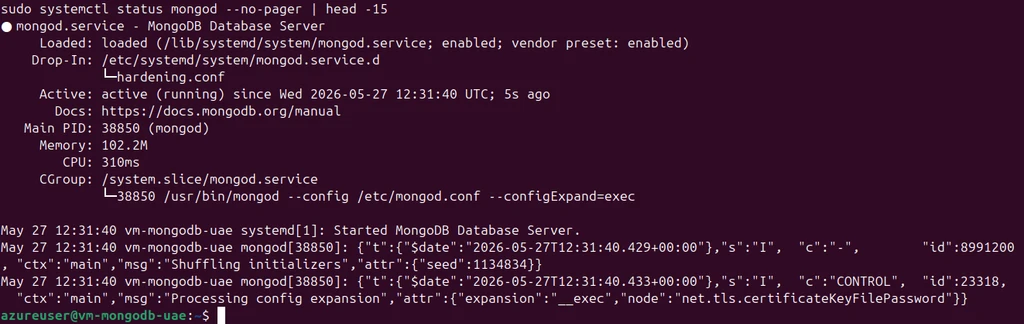
Port 27017 is listening on all interfaces, in mongod's process namespace:
$ sudo ss -tlnp | grep 27017
LISTEN 0 4096 0.0.0.0:27017 0.0.0.0:* users:(("mongod",pid=38850,fd=9))That state is not "the cluster is operational." mongod is in a specific, intentional condition: a pre-initiated replica set member. It knows it belongs to rs0 (from the replication.replSetName config), but rs.initiate() has never run. The oplog does not exist. There is no primary. No connection can write data.
The log reflects this. Every second, mongod emits warnings about things that will be true once the replica set is operational but are not yet:
"msg":"Aggregate command executor error",
"attr":{"error":{"code":26,"codeName":"NamespaceNotFound",
"errmsg":"Collection [local.oplog.rs] not found."}}
"msg":"Failed to refresh key cache",
"attr":{"error":"ReadConcernMajorityNotAvailableYet:
Read concern majority reads are currently not possible."}
"msg":"Failed to refresh query analysis configurations",
"attr":{"error":"PrimarySteppedDown: No primary exists currently"}These are not errors in the deployment sense. They describe mongod's correct view of its own state: it is a replica set member, the replica set has not been initiated, so the oplog does not exist, majority reads are not possible, and no primary has been elected. Each warning stops the moment rs.initiate() runs in the next part of this build.
The same install sequence runs on the other two nodes. Three mongods on three continents, each active (running) on port 27017 with TLS required and x.509 cluster authentication enforced.
Verifying the auth layer end-to-end#
Connecting to mongod from a client verifies that TLS, the cert chain, the DN extraction, and the user lookup all function together. The NSG correctly refuses port 27017 from anywhere except the peer subnets — including the operator's laptop — so the smoke test runs from inside one of the VMs. The operator's combined PEM (admin client cert + encrypted key) is built and copied in temporarily:
# On the operator's laptop:
cat ~/meetadev-mongo-pki/client/omollo.cert.pem \
~/meetadev-mongo-pki/client/omollo.key.pem \
> ~/meetadev-mongo-pki/client/omollo.combined.pem
chmod 600 ~/meetadev-mongo-pki/client/omollo.combined.pem
scp -i ~/.ssh/id_rsa \
~/meetadev-mongo-pki/client/omollo.combined.pem \
azureuser@<sa-vm-ip>:/tmp/omollo.combined.pemmongosh is installed on the VM via the same apt repository as the server, but only the mongodb-mongosh-shared-openssl3 package:
sudo apt-get install -y mongodb-mongosh-shared-openssl3=2.8.3The smoke-test connection presents the admin client cert and requests x.509 authentication:
mongosh "mongodb://localhost:27017/?tls=true&tlsAllowInvalidHostnames=true&authMechanism=MONGODB-X509&authSource=%24external" \
--tlsCAFile /etc/mongodb/tls/ca-chain.cert.pem \
--tlsCertificateKeyFile /tmp/omollo.combined.pem \
--eval "db.runCommand({ping:1})"tlsAllowInvalidHostnames=true is the localhost-test concession — the server's cert SAN names node-southafrica.mongo.internal, not localhost. In real client connections from Part 5 onward, the FQDN is used and that flag is dropped.
mongosh prompts for the client key's passphrase. The TLS handshake completes. mongod responds:
MongoServerError: Could not find user
"DC=mongo,DC=internal,CN=omollo,OU=cluster-clients,O=Meetadev"
for db "$external"
What this error confirms:
The TLS handshake completed. mongod accepted the client cert chain; the client accepted mongod's cert chain. Mutual TLS works.
mongod extracted the Subject DN from the client certificate:
DC=mongo,DC=internal,CN=omollo,OU=cluster-clients,O=Meetadev. The DN is in RFC 2253 canonical form, ordered leaf to root.mongod looked for that DN as a username in the
$externaldatabase — the standard MongoDB convention for x.509-authenticated users.mongod did not find one. The connection was refused.
After the test, the client PEM is removed from the VM:
sudo shred -u /tmp/omollo.combined.pemEvery layer below the user-lookup — TCP reachability, TLS, cert chain validation, DN extraction, the $external lookup — worked. The reason the operator cannot yet query the cluster is that no MongoDB user record exists for that operator. Creating that user is the work of the next part of this build: it requires the localhost exception, MongoDB's narrow rule that allows the first user to be created over a localhost connection without authentication, before any other user exists. After the exception is used and the user record is in place, the exception closes, and the cluster never again accepts an unauthenticated connection.
The order is: build the cluster, the cluster refuses to authenticate the operator, the operator uses the localhost exception to create the user record, the cluster authenticates the operator from then on. In environments where deployment is run by automation against a clean install, the same sequence applies. Every connection from this point presents a cert chain; every cert chain presents a DN; every DN is matched against $external.
What this layer is not#
The same pattern as Part 3: name the gaps. Each one is a known, acceptable distance from a financial-grade deployment.
Premium SSD P6 (64 GiB) per node instead of P10 or P15. Calibrated for series workload, not for production data growth.
Public SSH endpoint with
/32firewall instead of Bastion-only or jump-host access. The/32shrinks the public aperture to one address, which is appropriate for personal infrastructure; production deployments use Bastion (~$140/month for Standard) or VPN-only access.Passphrase stored in a file on disk rather than pulled from Key Vault at boot via managed identity. The file is owned and read-only by the mongod user, but it is still local on the database host. A production deployment would use a systemd helper that fetches the secret from a vault at boot, leaving nothing on disk.
MongoDB apt repo consumed directly rather than mirrored internally for change control. Production deployments mirror to Artifactory or Nexus to control update timing.
No cgroup limits, AppArmor profile, or SELinux profile beyond the systemd hardening. Appropriate for dedicated-VM mongod where mongod is the only meaningful workload; would be added on multi-tenant hosts.
No
tls.FIPSModebecause Ubuntu's default OpenSSL is not FIPS-validated. Adding FIPS mode without the validated library underneath is theatre.No explicit cipher-suite pinning — TLS 1.2/1.3 default suites instead. Production deployments in regulated industries pin specific suites; this build uses what mongod's link-time OpenSSL provides.
A regulated production deployment would close all of these. None of them require redesigning the work already done — they extend it. The staged upgrade path is plausible: move the disks to P10 first, add Bastion second, switch to vault-fetched passphrases third, mirror the apt repo fourth.
What's next#
The next part initiates the replica set. rs.initiate() runs against one of the nodes; the three nodes find each other over their x.509 certs and the private DNS from the network foundation; an election picks a primary. Right after that, the localhost exception is used to create the operator user, and the cluster begins authenticating the connections it was designed to authenticate.
Four down. One cluster left to build. 🎯
mongod is alive on three continents. 🌍 TLS required, x.509 enforced, no shared secrets, no second chances. The substrate became a database. 🔐
And the punchline: the database said no first. To me. By name. "Could not find user CN=omollo, OU=cluster-clients..." 🚫 That refusal is the most honest summary of what got built today.
The trust chain it's enforcing was built in the previous piece: Root in the vault, intermediate on the wire. 📖
⏭️ Part 5 is next: rs.initiate() runs, the three nodes find each other, an election picks a primary, the cluster becomes a cluster. The operator user gets created via the localhost exception — and the database starts answering "yes" to the connections it should. 🗳️
Drop a comment with your own MongoDB hardening choices. ⚡ Follow on Meetadev. Connect on LinkedIn. 👋
2 comments